
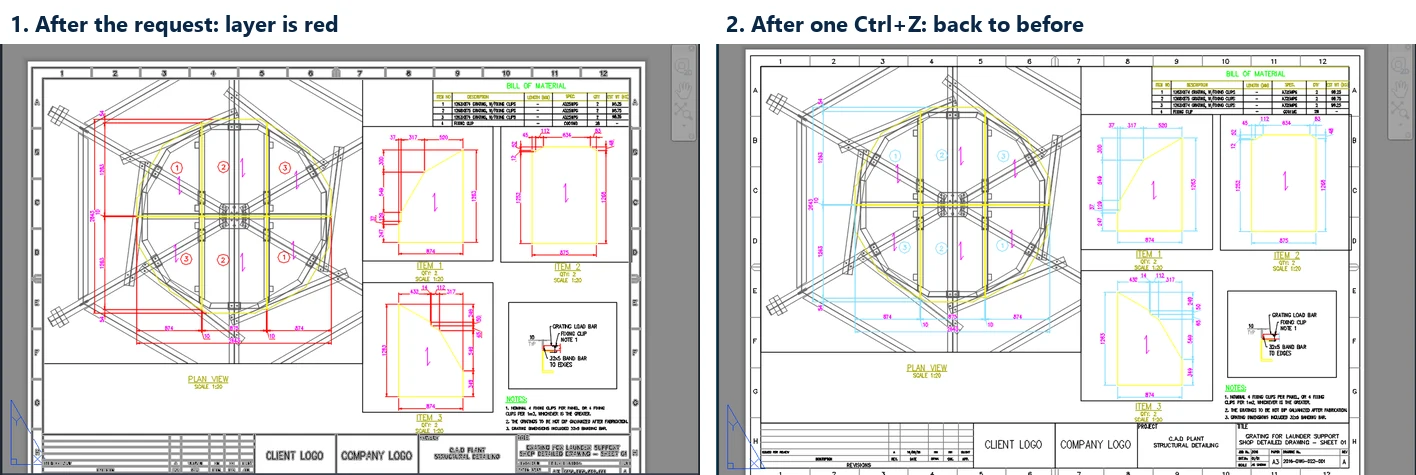
One Ctrl+Z
Small, non-destructive changes are made at once. One Ctrl+Z in AutoCAD reverts the whole request.
AutoCAD MCP connects Claude Desktop to AutoCAD. Claude can read the active drawing and, when you ask, change it: layers, entities, text, blocks, layouts and more. It is part of CAD Batch Pro, with no separate install and no separate price.
A plug-in inside AutoCAD and a helper program that Claude Desktop starts talk to each other over a local Windows pipe. AutoCAD MCP opens no network port and sends nothing to us.
What Claude receives, such as layer names, text, attribute values or a picture of the view, is handled under your Claude account and Anthropic's terms. Do not connect Claude to drawings you may not share.
Right-click its icon in the system tray, next to the clock, and choose Quit. Closing the window is not enough.
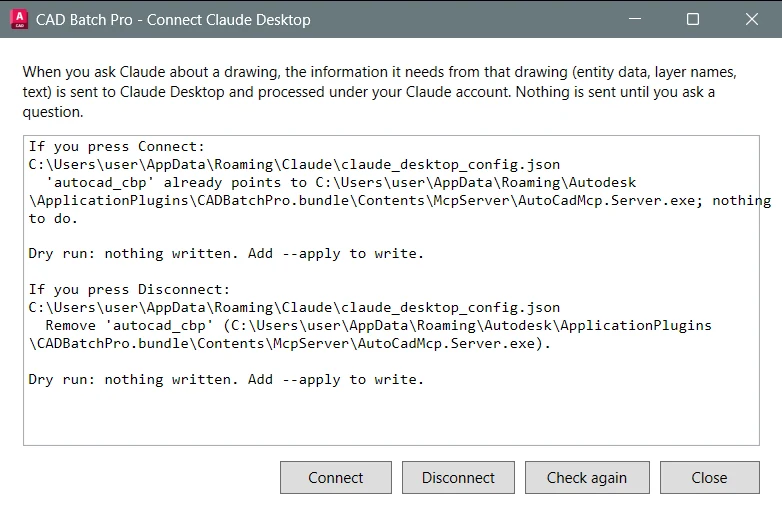
It is on the MCP panel of the CAD Batch Pro tab. Or type CBP_MCP_CONNECT.
It shows what will change in Claude Desktop's settings. Only the entry autocad_cbp is added, your other connectors are not touched, and a backup of the settings file is kept next to it.
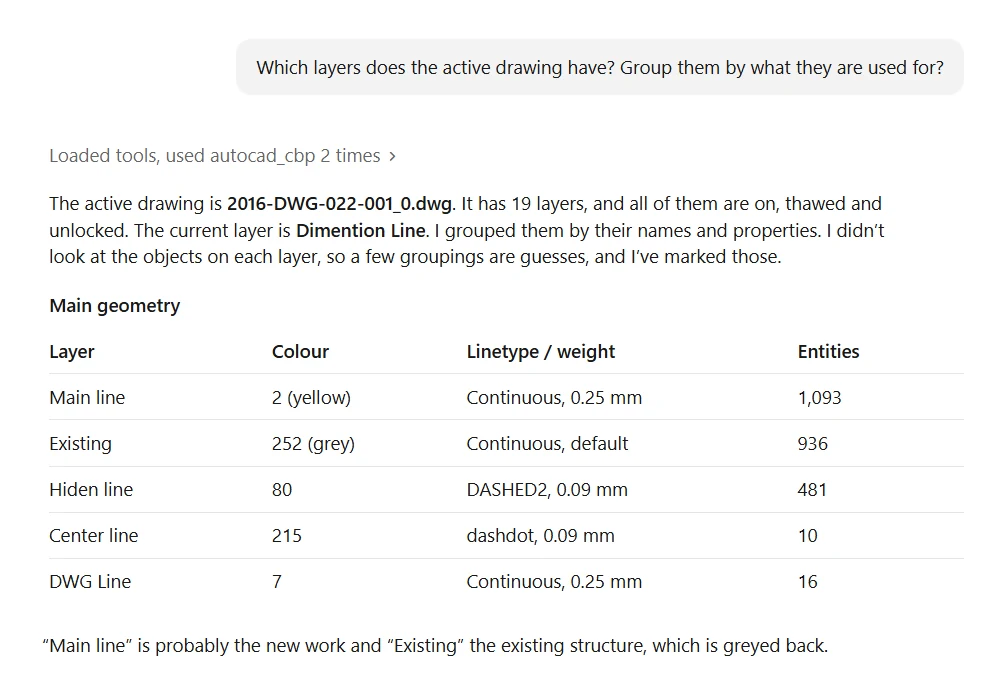
The connector autocad_cbp appears under Settings, Connectors. Open a drawing and ask, for example, "Which layers does the active drawing have?" By default Claude Desktop asks your permission before it uses a tool. Its Auto mode may not, so check the mode you are in.
To disconnect, press Disconnect in the same window while Claude Desktop is closed.
Small, non-destructive changes are made at once. One Ctrl+Z in AutoCAD reverts the whole request.
Anything that erases, purges, saves, replaces or touches many objects comes back as a preview first and is applied only with a one-time confirmation code from that preview. The preview tells Claude to show you what would change and to continue only if you agree, but that is an instruction to Claude, not a question AutoCAD MCP asks you. To approve each change yourself, keep your assistant's permission prompts turned on or ask Claude to show you the preview first.
New files, such as exported tables, are written only to folders you list in %USERPROFILE%\.autocadmcp\config.json. By default none is allowed, so every file request is refused. An existing file is never overwritten.
Claude can also open and close drawings in AutoCAD when you ask. Opening is limited to the folders you allow. Closing a drawing with unsaved changes needs a confirmation code and an explicit choice to save or discard; Claude is told to ask you first. Opening and closing is not on the Ctrl+Z stack.
By default Claude Desktop asks your permission before it uses a tool (its Auto mode may not), and you can disconnect at any time. Tools that only read do not change the drawing.
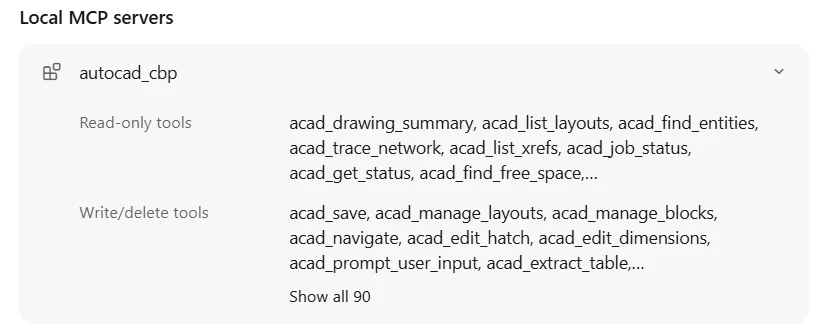
35 tools only read and inspect the drawing and are free. The other 55 can change a drawing, its view or files, open and close drawings, or hand a batch job to CAD Batch Pro, and use the same CAD Batch Pro licence check as the batch tools.
Browse every toolAutoCAD MCP is included in the CAD Batch Pro subscription: a free trial on the Autodesk Marketplace, then 99 USD per user per year. There is no separate price for AutoCAD MCP, and reading and inspecting drawings is free.
A real conversation about a demo drawing that was open in AutoCAD. The line above the answer shows that Claude used the autocad_cbp connector to look.
Each one uses tools from the catalogue. Claude shows what it plans to do before anything risky.
"Which layers does this drawing have, and are any dimensions overridden with a number that does not match what they measure?"
"Compare this drawing's layers and text styles with our company standard and list the differences." You name the standards file, which must be in a folder you have allowed.
"Find every note that says BILL OF MATERIAL and show me before changing it to BOM."
"What is the layer, colour and linetype of the selected objects?" Reading properties is free. "Switch to layout A101." Or "Open the drawing X.dwg from my project folder", if that folder is allowed.
"Purge these four drawings." Claude passes the job to CAD Batch Pro, which keeps its usual .cbp.bak backups. The job comes back as a preview first and is applied only with the confirmation code; Claude is told to show you the impact and continue only if you agree. The drawings must be in a folder you have allowed, and drawings open in AutoCAD are skipped. The small job file and its result file are deleted automatically 30 days after their last write (you can change that or turn it off in the AutoCAD MCP configuration); the .cbp.bak copies are never deleted.
AutoCAD MCP sends nothing to us and opens no network port. When you ask Claude something, the results Claude asks for, such as layer names, text or a picture of the view, go to Claude Desktop and are handled under your own Claude account and Anthropic's terms. Nothing is sent until you ask.
Yes. The Connect Claude button sets up Claude Desktop, and it needs to be signed in to your Claude account.
No. It is part of the CAD Batch Pro subscription. Reading and inspecting drawings is free; tools that change a drawing use the same licence as the batch tools.
Press Ctrl+Z in AutoCAD: one press reverts the whole request. Risky changes come back as a preview with a one-time confirmation code first; Claude is told to show it to you, but AutoCAD MCP does not ask you itself. Opening, closing or switching drawings is not on the undo stack, which is why closing a drawing with unsaved changes needs a confirmation code first.
Quit Claude Desktop, open the Connect Claude window in AutoCAD and press Disconnect. Only the autocad_cbp entry is removed.
Repeat Connect with Claude Desktop completely quit (from the system tray, not just the window). MCP Status on the MCP panel prints the licence state and the pipe AutoCAD listens on.
The tools that change a drawing need an active trial or subscription. Sign in to your Autodesk account in AutoCAD; reading and inspecting still works without it.
The helper is signed by Hoang Van Hiep. On Windows SmartScreen choose More info, then Run anyway. If AutoCAD asks about a Signed File Not in Trusted Folder, check the publisher name and choose Always Load.
In %LOCALAPPDATA%\AutoCadMcp\logs, also reachable from Settings, Open MCP log folder. They hold technical events, not drawing content, and are safe to delete.
See the privacy policy for what CAD Batch Pro collects.